I landed at the airport with zero roaming data and a dead group chat. My friend had sent the Airbnb door code on iMessage, but iMessage stubbornly refused to activate on the airport WiFi. A stranger at the baggage belt told me to just install WhatsApp -- it took under a minute with my phone number, found my contacts instantly, and pulled up the door code from the group chat my friend had already migrated to. I was inside the apartment within twenty minutes. I have not uninstalled it since.
What Is WhatsApp Messenger
WhatsApp Messenger is a free cross-platform messaging app owned by Meta that lets you send text messages, make voice and video calls, share files, and create group chats -- all over an internet connection instead of your cellular plan. It is built for anyone who wants fast, reliable communication without worrying about SMS fees, international texting charges, or whether the other person uses an iPhone or an Android. With over two billion active users worldwide, it is the default messaging app in large parts of Europe, Latin America, South Asia, and Africa. If you travel, work remotely, or have friends and family spread across different countries, WhatsApp is almost certainly already on their phones.
How It Works
WhatsApp ties your account to your phone number, which means setup is about as frictionless as it gets. Here is the basic flow:
- Install the app, verify your phone number with a one-time SMS code.
- WhatsApp scans your phone contacts and shows you everyone who is already using it -- no usernames, no friend requests.
- Tap any contact to start chatting. Messages are encrypted end-to-end by default; you do not have to enable it.
- For groups, tap "New Group", pick members, name it, and start sending messages that everyone sees.
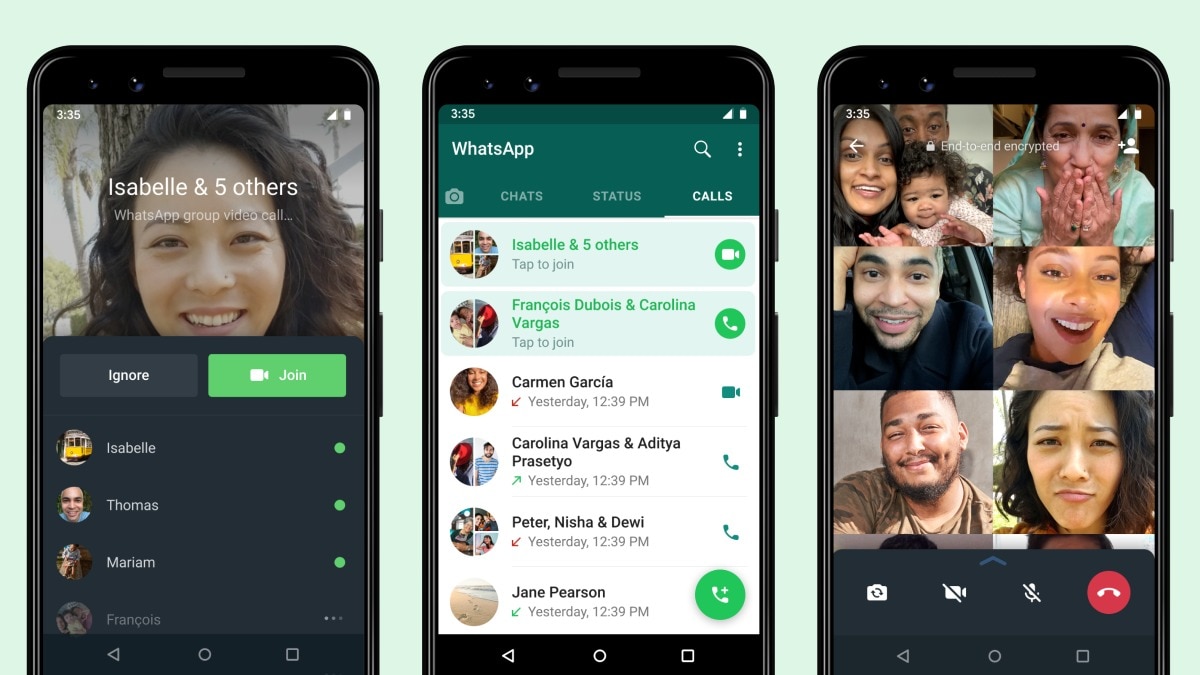
- Calls work the same way -- just tap the phone or video icon in any chat and it connects through the internet.

WhatsApp chat list: all conversations in one place, with online status indicators and last-seen timestamps.
Key Features
Instant Contact Discovery
This is the feature that saves you the most time. You do not create a username, send a friend request, or remember a handle. WhatsApp reads your existing phone contacts and immediately shows you which of them are already on the platform. When someone you know joins WhatsApp, they show up in your chat list automatically. No "hey, what is your WhatsApp?" -- you already know.
End-to-End Encrypted Messaging by Default
Every text message, voice call, video call, photo, and file you send through WhatsApp is encrypted end-to-end. This is not a setting you toggle on -- it is built into every conversation automatically. Even WhatsApp cannot read your messages. For anyone handling sensitive conversations, work discussions, or just personal chats you would rather keep private, this is a significant advantage over SMS and many other messengers.
Cross-Platform Sync with WhatsApp Web
You can type on your computer while your phone stays in your pocket. WhatsApp Web mirrors your phone conversations in any browser, and the desktop app does the same as a native application. Messages sync in real time, so you can start a conversation on your phone and finish it on your laptop without missing a beat. Great for long typing sessions, sharing files from your computer, or just not wanting to pick up your phone during a workday.
Voice and Video Calls That Just Work
WhatsApp calls run entirely over data, meaning you pay nothing per minute and skip the per-minute international rates carriers love charging. Call quality is consistently solid even on mediocre connections, and group video calls support up to 32 people. I have used it for work meetings, family calls across continents, and quick check-ins -- the reliability has been more consistent than some paid conferencing tools I have tried.
Group Chats with Granular Controls
Groups can hold up to 1,024 members. Admins get fine-grained control over who can send messages, who can change group info, and whether new members need approval. Polls, pinned messages, disappearing message timers, and message reactions make big group coordination manageable. My extended family uses one group for daily chat and another for event planning, and the distinction actually holds because of the admin tools.
Media and File Sharing Without Compression Headaches
You can send photos and videos in their original quality by attaching them as documents instead of media. File sharing supports PDFs, spreadsheets, zips, APKs, and most common formats up to 2 GB. This alone replaced the "email myself the file" dance I used to do between my phone and computer.
App Screenshots

A one-on-one chat in WhatsApp: text, voice notes, emoji reactions, and quick-access call buttons at the top.

Step-by-Step Tutorial: Get Set Up and Chatting in Under Two Minutes
Here is the fastest path from download to your first message:
- Install and verify. Open the app, enter your phone number, and wait for the 6-digit SMS code. The app auto-fills it on most devices.
- Set your profile. Add your name and an optional profile photo. This is what other WhatsApp users will see when you message them.
- Grant contact permission. Allow WhatsApp to access your phone contacts. This is what powers the automatic contact discovery -- without it, you will have to add numbers manually.
- Start a chat. Tap the chat icon (bottom right on Android), pick a contact from the list, and start typing. If you see their profile photo and status, they are already on WhatsApp.
- Create a group. Tap the same chat icon, choose "New Group", select members from your contact list, give the group a name and optional icon, then tap create.
- Make a call. Open any chat and tap the phone icon for a voice call or the video icon for a video call. It connects through the internet, not your carrier minutes.
- Use WhatsApp Web. On your computer, go to web.whatsapp.com, scan the QR code with the WhatsApp app on your phone (Settings > Linked Devices), and your chats appear in the browser instantly.
- Share files. In any chat, tap the attachment icon (paperclip), choose "Document" instead of "Gallery" to send photos and videos without compression. For other file types, pick from your file manager.
Use Cases
- Staying in touch with family abroad. Free voice and video calls across borders, no per-minute charges. Group chats keep everyone in the loop without a dozen separate conversations.
- Traveling internationally. Airport WiFi, hotel WiFi, or a local SIM -- WhatsApp works on any internet connection. Your number stays the same; your chats follow you.
- Work and team coordination. Plenty of small businesses and remote teams run entirely on WhatsApp groups. Quick voice notes replace long emails, polls settle decisions fast, and file sharing handles contracts and spreadsheets.
- Event planning. Birthday parties, weddings, group trips -- a WhatsApp group with pinned messages for key info and poll features for date-voting is cleaner than email chains and group texts.
- Buying and selling locally. In many countries, WhatsApp is the standard channel for communicating with sellers on marketplaces, real estate agents, and local service providers.
- Backup communication channel. Even if iMessage or your carrier SMS acts up, WhatsApp runs independently over data. It has bailed me out multiple times when my regular texting broke.
Tips & Tricks
- Pin up to three chats. Long-press a chat and tap the pin icon. Pinned chats stay at the top regardless of newer messages -- great for your partner, your boss, or your main group.
- Star important messages. Long-press any message and tap the star. Access all starred messages from the chat menu later. I use this to bookmark addresses, door codes, and shopping lists sent in group chats.
- Use broadcast lists for announcements. A broadcast list sends the same message to multiple contacts individually, not in a group. Recipients see it as a personal message. Perfect for event invites.
- Set disappearing messages per chat. You can set messages to delete after 24 hours, 7 days, or 90 days on a per-chat basis. Useful for sensitive conversations or just keeping your chat list tidy.
- Reply privately in groups. Long-press a group message and choose "Reply Privately" to open a one-on-one chat with that person, quoting the original message. Great for quick side conversations without leaving the group.
- Mute noisy groups. You can mute group notifications for 8 hours, 1 week, or always. The messages still arrive; your phone just stops buzzing every two seconds.
- Back up your chats. Go to Settings > Chats > Chat backup and set up automatic daily backups to Google Drive. If you switch phones or reinstall, your entire chat history restores.
- Format your text. Surround text with asterisks for *bold*, underscores for _italic_, and tildes for ~strikethrough~. Monospace is three backticks. Small touches that make longer messages more readable.
Pros & Cons
Pros
- Setup takes under a minute with just a phone number -- no usernames, no passwords, no friend requests.
- End-to-end encryption on every message and call by default, with no configuration needed.
- Cross-platform sync between phone, desktop app, and web browser works smoothly and in real time.
- Free voice and video calls worldwide, even on mediocre connections -- no carrier minutes required.
- Group chat features (polls, pinned messages, admin controls, replies) are genuinely well thought-out.
- Massive global user base means the person you want to reach is probably already on it.
Cons
- Requires a phone number for signup -- no email-only or username-only accounts. The linked-device mode still needs a phone as the primary device.
- Parent company Meta collects metadata (who you message, when, for how long) even though message content is encrypted. Privacy-conscious users may prefer Signal.
- File size limit of 2 GB is generous but can be frustrating for video editors or people sharing large media batches.
- No built-in translation feature. If you chat with people who speak different languages, you will be copying and pasting into Google Translate.
- Notifications can get overwhelming if you are in too many active groups -- muting helps but requires manual management.
Alternatives / Comparison
| App | Core difference | Best for |
|---|---|---|
| Telegram | Larger groups (200k), channels, bots, cloud storage | Communities, broadcast channels, power users |
| Signal | Zero metadata collection, open-source, nonprofit | Maximum privacy, journalists, activists |
| iMessage | Apple-only, deeply integrated with iOS and macOS | Apple ecosystem users who rarely message Android |
| WhatsApp Messenger | Phone-number-based, universal adoption, simple UX | Everyday messaging with the widest possible reach |
FAQs
Is WhatsApp really free?
Yes. WhatsApp does not charge for messages, calls, or file sharing. It uses your internet connection (WiFi or mobile data), so your carrier may charge for data usage if you are not on WiFi. There is no subscription and no ads in the chat interface.
Can I use WhatsApp without a phone number?
No. A phone number is required to create a WhatsApp account. However, you can use WhatsApp Web or the desktop app as a linked device after the initial phone setup, and the phone does not need to be on the same network -- just connected to the internet.
Are WhatsApp messages really private?
Message content is end-to-end encrypted, which means only you and the recipient can read what is sent -- not even WhatsApp can decrypt it. However, Meta collects metadata such as who you contact and when. If that concerns you, Signal collects less metadata.
How many people can join a WhatsApp group?
Up to 1,024 members per group. Group video calls support up to 32 participants. For larger communities, Telegram supports up to 200,000 members in a single group, which makes it a better fit for massive public communities.
Can I transfer WhatsApp chats to a new phone?
Yes. On Android, a Google Drive backup restores your entire chat history. If switching between Android and iPhone, WhatsApp now supports chat transfer via a dedicated migration tool, though the process is slightly more involved than same-platform transfers.
Does WhatsApp work on tablets or multiple phones?
WhatsApp now supports linking up to four additional devices (phones, tablets, or computers) to one primary phone account. Each linked device works independently -- the primary phone does not need to be online for linked devices to send and receive messages.
What is the difference between WhatsApp and regular SMS?
SMS uses your cellular plan and can incur per-message or international fees. WhatsApp sends messages over the internet, so you pay nothing per message. WhatsApp also supports read receipts, typing indicators, high-quality media sharing, and group chats with far more features than standard MMS group texts.
Conclusion
WhatsApp is not the flashiest messaging app, and it does not need to be. What it does is the thing that actually matters: it works, it works everywhere, and everyone you know is already on it. The setup takes no time at all, the calls are free, the encryption is solid, and the cross-device sync means you are never stuck typing on a tiny screen when a full keyboard is right there. If you have been putting off installing it because "everyone I talk to uses iMessage" or "I already have SMS," you are one international trip or group-planning headache away from realizing how much easier it makes things. Give it five minutes, send a message to the first contact that shows up with a WhatsApp badge, and see how fast they reply.
Safety Note and Disclaimer
Our website is a third-party distribution and information site, not the official app store or the app developer.
Download only from a source you trust and verify the source.
Review the permissions the app requests and decline anything that looks excessive.
Keep your device's security settings and antivirus up to date.
Prefer official stores (Google Play) when the app is available there.
This article is an independent overview and is not affiliated with the app's developer.