I switched to Telegram three years ago after one too many group chats got scattered across three different apps. What started as "let me try this for a week" turned into my daily driver for personal and work communication. This guide covers what I have learned, the features that actually matter, and how to get set up without wasting time.
What Is Telegram
Telegram is a cloud-based messaging app that works across phones, tablets, and desktop computers. Your messages sync in real time, so you can start a conversation on your phone and continue it on your laptop without missing a beat. It is built for people who want fast messaging, large file sharing, and privacy controls without paying for a subscription.
How It Works
The core loop is simple. You sign up with a phone number, verify with a code, and you are in. From there, the app handles three things at once.
- Cloud sync. Every message, photo, and file lives on Telegram's servers, not just on your phone. Switch devices and your history follows you.
- End-to-end secret chats. For conversations you want kept private, you start a Secret Chat that encrypts directly between devices. These do not sync to the cloud.
- Channels and groups. You can join channels that broadcast to unlimited subscribers, or create groups with up to 200,000 members. This is where Telegram pulls ahead of most competitors.

Key Features
Cloud Storage Without Limits
Every message you send is stored in the cloud. I have messages from 2022 that I can still search and pull up on any device. You can also use the Saved Messages chat as a personal notebook. I store screenshots, links, and voice notes there. It works like a scratchpad that follows you everywhere.
Large File Sharing
Telegram lets you send files up to 2 GB each. I have sent full-resolution video projects and 500-page PDF manuals through it without compression. Most other messaging apps cap you at 100 MB or compress media until it looks like mud. Telegram does not touch your original file quality.
Channels and Groups
Channels are one-way broadcast feeds. News outlets, software projects, and content creators use them to push updates to subscribers. Groups are two-way and can hold up to 200,000 people. I run a 300-member group for a hobby community, and the threading, polls, and admin tools make it manageable even at larger scales.
Bots
Bots are automated accounts that respond to commands. You can find bots that download media, track packages, run polls, or even play games. The BotFather bot lets you create your own bot without writing server code. I use a reminder bot that pings me when my weekly tasks are due. It saves me from installing yet another to-do app.
App Screenshots
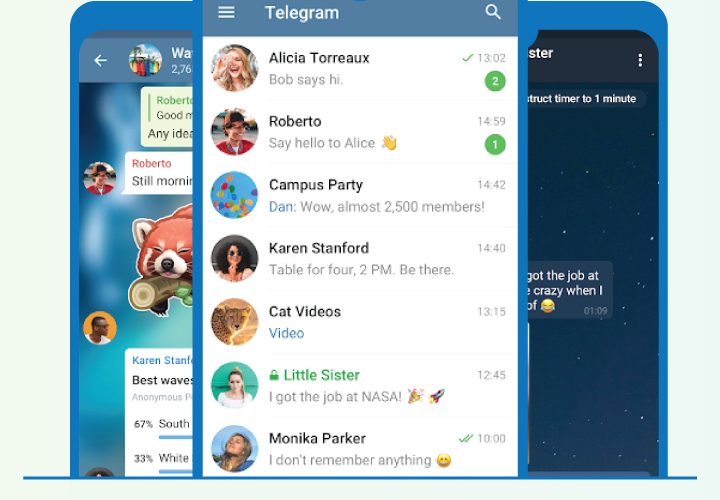
Step-by-Step Tutorial
Here is how to go from zero to fully set up in about ten minutes.
- Install Telegram from Google Play or your device's app store. Open it and tap Start Messaging.
- Enter your phone number. Telegram sends a verification code via SMS or an in-app message if you already have Telegram on another device.
- Enter the code, set your display name, and optionally add a profile photo. You are now in.
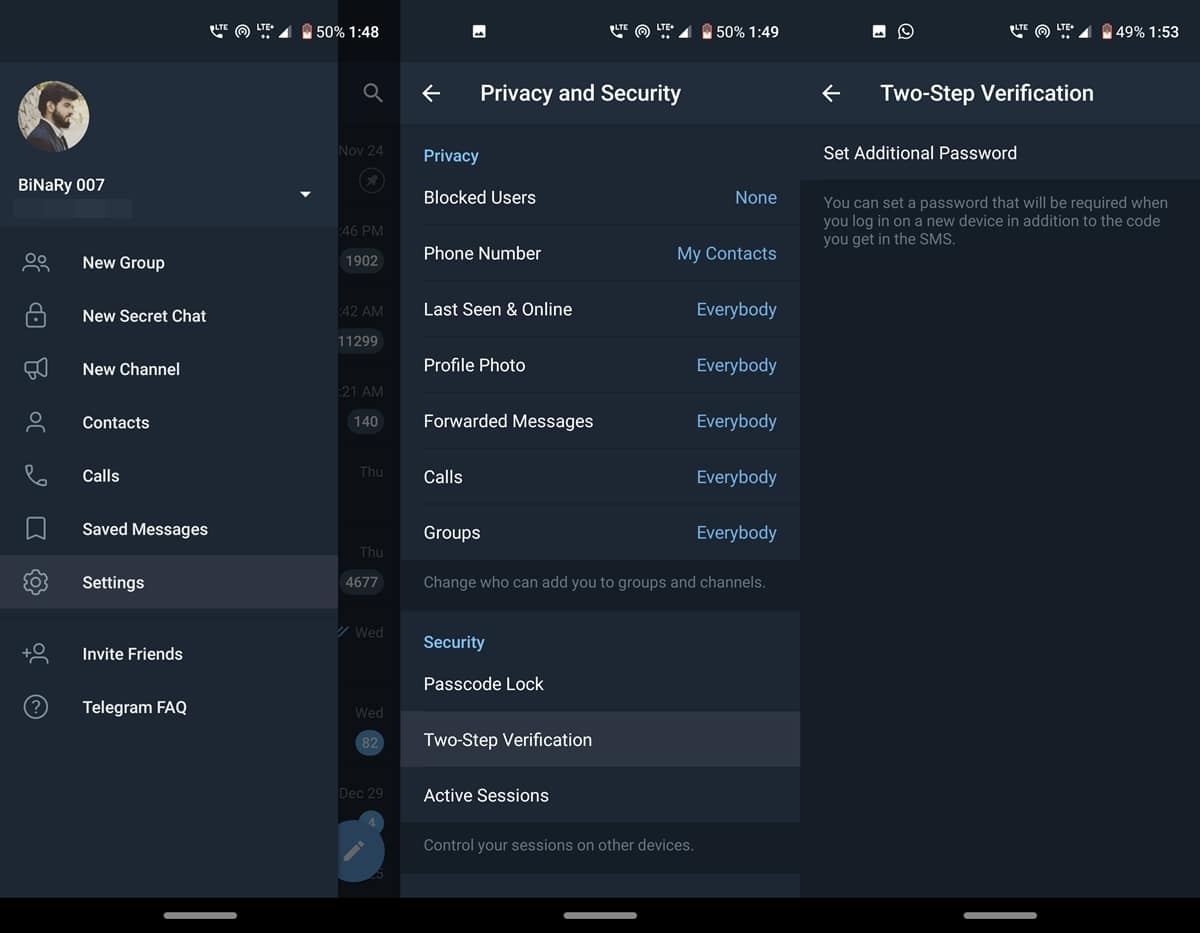
- Go to Settings, then Privacy and Security. Turn on Two-Step Verification and set a password. This prevents someone from logging in with just your phone number.
- Set your phone number visibility to Nobody or My Contacts. This stops strangers from finding your account through your number.
- Start your first chat. Tap the pencil icon, search for a contact by username, or paste a t.me link to join a channel or group.
- Try the Saved Messages chat. Forward a link or photo there to test cloud sync. Open Telegram on another device and confirm it appears.
Use Cases
- Team communication. Small teams can replace email chains with a Telegram group. Files, voice notes, and links stay in one thread, searchable from any device.
- Content distribution. If you publish articles, videos, or newsletters, a Telegram channel lets you push updates directly to subscribers without algorithm interference.
- Personal cloud drive. Send files to Saved Messages and access them from anywhere. I use it as a quick transfer tool between my phone and laptop.
- Community building. Hobby groups, study circles, and local event organizers can run a 200,000-member group with threaded replies, polls, and pinned messages.
Tips & Tricks
- Use folders to organize chats. I have separate folders for Work, Family, and Channels. It cuts the noise when I only want to see one category.
- Schedule messages. Long-press the send button and pick a time. I use this for birthday messages and work reminders that need to go out at a specific hour.
- Edit sent messages. Tap and hold any message you sent, select Edit, and fix typos without sending a correction. The recipient sees the updated version.
- Use slow mode in large groups. If you admin a busy group, set slow mode to 30 seconds or a minute. It prevents spam and keeps conversations readable.
- Set a self-destruct timer in Secret Chats. Messages disappear after a set time. Good for sensitive information you do not want lingering on a device.
Pros & Cons
Pros
- True cross-device sync. Your full message history is available on every logged-in device.
- Generous file limits. 2 GB per file with no compression on original quality.
- No ads in private chats or small groups. The app stays clean for personal use.
- Bots and channels add functionality that most messaging apps do not offer.
Cons
- End-to-end encryption is not on by default. You have to manually start a Secret Chat for it.
- Phone number is required to register. There is no email-only signup option.
- Some regions block Telegram or throttle its connection, requiring a VPN to use reliably.
Alternatives / Comparison
| App | Core difference | Best for |
|---|---|---|
| End-to-end encryption by default, but smaller file limits and no channels | Users who want encryption without setup and have smaller sharing needs | |
| Signal | Maximum privacy focus, open source, but fewer community features | Privacy-first users who do not need channels or large groups |
| Telegram | Cloud sync, large groups, channels, bots, and 2 GB file sharing | Users who want one app for messaging, file transfer, and community building |
FAQs
Is Telegram free to use?
Yes. The core app is free with no ads in private chats or small groups. A Premium subscription exists that adds faster download speeds and larger upload limits, but it is optional.
Are my messages encrypted on Telegram?
Regular chats use server-client encryption. For full end-to-end encryption, start a Secret Chat. Messages in Secret Chats stay on the two devices and never touch the cloud.
Can I use Telegram on multiple devices at the same time?
Yes. You can log in on your phone, tablet, and desktop simultaneously. All regular chats sync across devices in real time.
How do I join a Telegram channel?
Search for the channel name in the app, or open a t.me link in your browser. Tap Join and you will start receiving posts from that channel.
Does Telegram compress photos and videos?
By default, Telegram compresses media for faster sending. You can send files in original quality by choosing the Send as File option when sharing photos or videos.
Conclusion
Telegram earned its spot on my home screen by doing three things well. It syncs across every device I own, it handles large files without choking, and the channel and group system gives me tools for communication that go beyond one-on-one chatting. If you have been using the same messaging app for years and never thought about switching, give Telegram a week. Set up two-step verification, join a couple of channels, and send a large file to Saved Messages. That is usually enough to tell if it fits your routine.
Safety Note and Disclaimer
Our website is a third-party distribution and information site, not the official app store or the app developer.
Download only from a source you trust and verify the source.
Review the permissions the app requests and decline anything that looks excessive.
Keep your device's security settings and antivirus up to date.
Prefer official stores (Google Play) when the app is available there.
This article is an independent overview and is not affiliated with the app's developer.