The first day of junior year, I walked into homeroom and nobody recognized me. Not because I got a glow-up over summer - because I walked in with the cartoon face lens on, recording everyone's reactions. By second period, half the class had added me back. That back-to-school filter drop was wild. Here is everything I picked up about using Snapchat to survive (and flex on) the new school year.
What Is Snapchat
Snapchat is a camera-first messaging app where photos and videos disappear after you view them. Think of it as texting but with your face as the keyboard. You snap a photo, slap a filter on it, send it to your friends, and it vanishes. That disappearing act is the whole point - it keeps things casual and low-pressure. No grid to curate, no likes to chase. For teens, it is the app where you actually act like yourself instead of performing for a feed.
How It Works
The app opens straight to the camera. No feed to scroll, no home page to land on. You just point, shoot, and go. Here is the basic loop:
- Open the app. The camera is already staring at you. Tap the screen to focus, or tap and hold to bring up the Lens carousel.
- Swipe through lenses. Some are made by Snapchat, some are made by creators, and some are sponsored. Tap one to try it on your face in real time.
- Take the snap. Tap the shutter for a photo, or hold it for a video (up to 60 seconds). You can also swipe left to enter Chat, or swipe right for Stories from friends and creators.
- Add text, stickers, or music. Tap the toolbar on the right side. You can tag a location, add the time, drop a GIF sticker, or link a song.
- Send it. Pick friends, add to your Story, or post to Spotlight. The snap disappears after they view it (unless they screenshot it - you will get a notification).
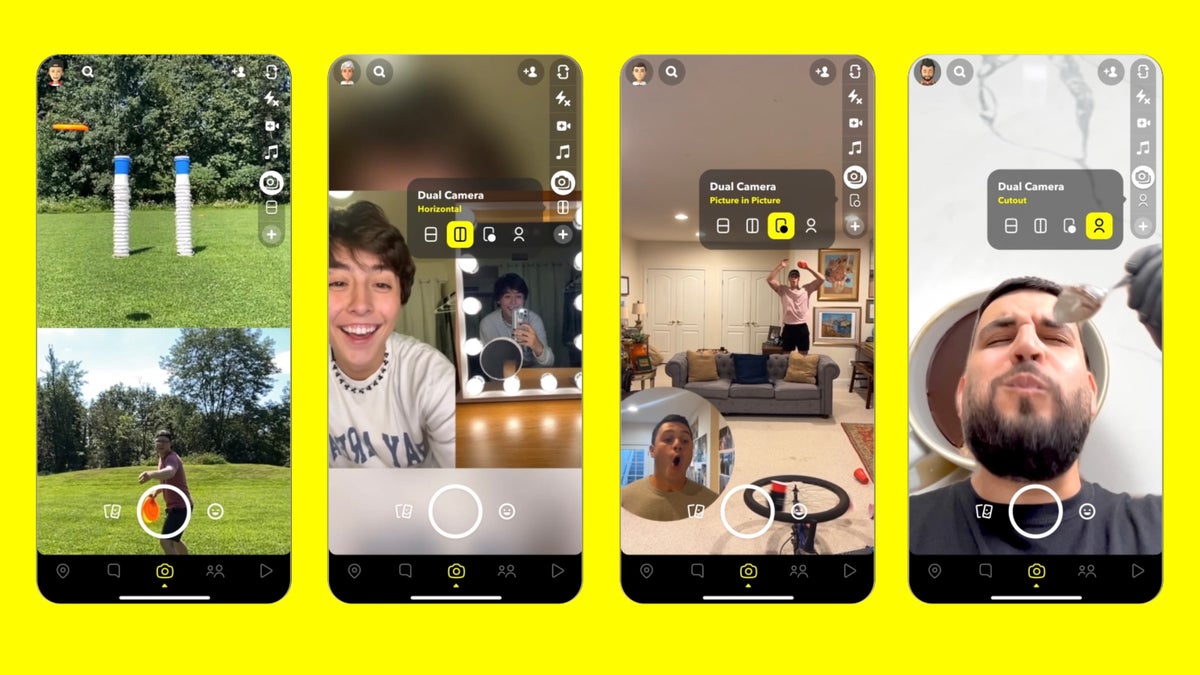
The camera opens immediately. Swipe through the Lens carousel to try back-to-school filters before you snap.
Key Features
AR Lenses and Filters
This is the feature. Lenses use augmented reality to track your face and overlay effects - dog ears, cartoon skin, voice changers, full-body transformations. Snapchat drops seasonal packs, and the back-to-school collection is always huge. I have spent embarrassing amounts of time just swiping through new ones. Some lenses respond to your facial expressions: open your mouth and fire comes out. Raise your eyebrows and the hat changes. It is stupid fun, and it is the reason half my friends even have the app.
Snap Map
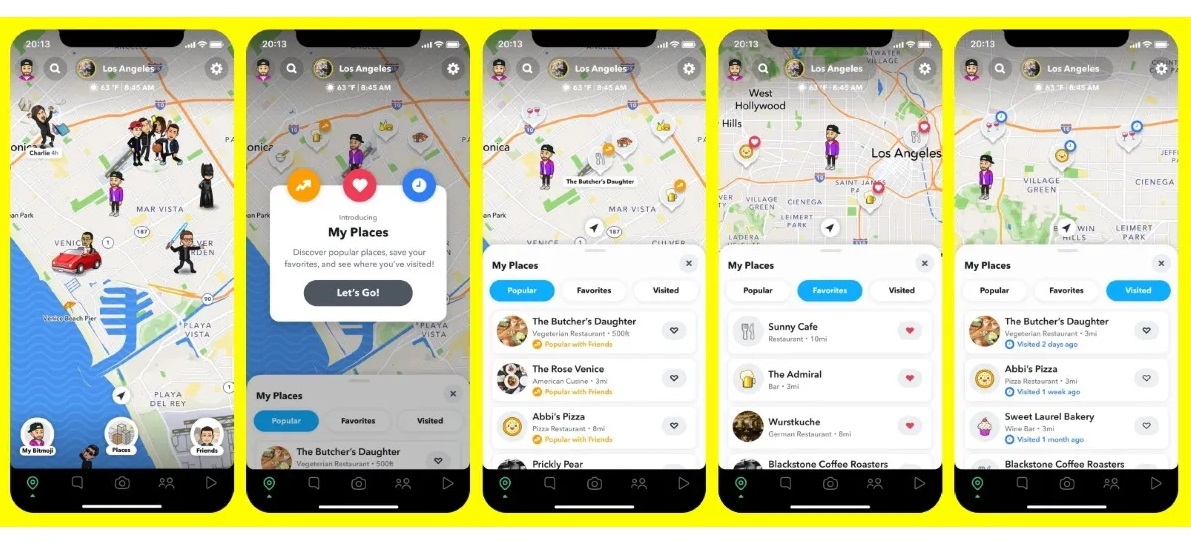
Snap Map shows where your friends are on a real map, in real time. I know it sounds creepy. But in practice, it is how my friend group coordinates after school. You can see who is at the mall, who made it to the football game, who is still at practice. You can also go into Ghost Mode if you do not want anyone seeing your location - I turn that on during family dinners.
Stories
Stories let you post snaps that stay viewable for 24 hours. Everyone on your friends list can tap through them. During the first week of school, my Story was basically a highlight reel: first day outfit, locker struggles, cafeteria food, the bus ride home. Friends reply to individual snaps in your Story by swiping up, which starts a private chat. It is a low-key way to stay in the loop without texting 15 different people.
Spotlight
Spotlight is Snapchat's answer to TikTok. Short vertical videos, infinite scroll, algorithm-curated. The difference is that Spotlight content is made with Snapchat's creative tools - lenses, sounds, stickers - so it has a distinct vibe. During back-to-school season, Spotlight floods with dorm room tours, first-day-of-school skits, and filter challenges. I have killed entire study halls scrolling through it.
Bitmoji Integration
Your Bitmoji is your cartoon avatar inside Snapchat. It shows up on the Map, in chats, and in Cameos (animated stickers where your Bitmoji acts out scenes). My Bitmoji has the same haircut and backpack as me in real life, which is a small thing but makes the app feel more personal. Friends can see your Bitmoji update when you change your outfit or hairstyle, which is honestly kind of fun.
Chat and Snapstreaks
Chat is where Snapchat gets addictive. If you and a friend snap each other at least once every 24 hours, you build a Snapstreak. The number goes up next to your name in chat. My longest streak is 347 days with my best friend. Lose the streak and you lose that number, which feels weirdly bad. Snapchat knows this. Streaks are the reason I open the app every single morning, even when I have nothing to say.
Discover and Original Shows
Discover is a tab where publishers and creators push content - news, entertainment, sports, comedy shorts. It is not the main reason teens use Snapchat, but it is where I catch up on pop culture drama and trending sounds. During back-to-school, publishers drop survival guides and trend roundups that are actually useful.
App Screenshots

The back-to-school Lens collection. Swipe to try each one before committing to a snap.

Step-by-Step Tutorial
Want to go from Snapchat noob to the friend everyone asks for filter recommendations? Here is how I set up mine at the start of the school year:
- Download and sign up. Open the app, tap Sign Up, and enter your birthday. You need to be at least 13. Pick a username - make it something you will not regret in two years, because you cannot change it later without making a new account.
- Set up your Bitmoji. Tap your profile icon, then Create Bitmoji. Pick your face shape, hair, eyes, outfit. The more accurate it is, the funnier the Cameos. I spent way too long on this. No regrets.
- Add friends. Sync your contacts, or search usernames manually. During the first week of school, everyone is adding everyone - just ask for their username at lunch.
- Try your first Lens. Tap the camera screen to open the Lens carousel. Swipe through the back-to-school collection. Tap any lens to see it on your face live. Take a test snap and send it to your best friend.
- Start a Snapstreak. Send a snap (not a chat message - an actual photo or video) to a friend. Have them snap you back. Do it again tomorrow. Do it again the next day. On day 3, the fire emoji appears.
- Post to your Story. Take a snap, tap the square with a plus sign next to Send, and it goes to your Story. All your friends can view it for 24 hours. First-week-of-school content is basically mandatory.
- Explore Spotlight. Swipe up from the camera or tap the Play icon. Scroll through videos. If you tap the heart, similar content shows up. Within a day, Spotlight learns what you like.
- Turn on Ghost Mode when needed. Tap the Map pin, then Settings, then Ghost Mode. Do this during family events, exams, or any time you do not want people knowing where you are.
Use Cases
- First-day-of-school Story: snap your outfit, your locker, your schedule, your reaction to seeing friends after summer. Post them all to your Story. By the end of the day, you will have replies from people you forgot existed.
- Filter challenges with friends: pick a weird lens, everyone does it at the same lunch table, and you vote on whose is the funniest. We did this every Friday last semester. It never got old.
- Group chat coordination: make a group chat for your friend group. Send snaps about where to meet, what the plan is, who is running late. Faster than a group text and way more fun.
- After-school hangouts: check Snap Map to see who is free and nearby. No need to text five people individually - just look at the map and head toward the cluster.
- Homework help via Chat: snap a photo of the problem you are stuck on, send it to the smart kid in your class. They can snap back the solution. Faster than typing out a math problem.
- Sport and club hype: snap warm-ups, the scoreboard, the crowd. Post to your Story. Teammates and friends who could not make it get to feel like they were there.
Tips & Tricks
- Save your streaks before updating the app. Sometimes updates log you out or glitch. Send a snap to your streaks right before you update, just in case.
- Use Lens Explorer to find hidden gems. Tap the search icon in the Lens carousel. Type "back to school" or "first day" to find community-made lenses that are not in the default carousel. Some of these are way better than the official ones.
- Customize your Story viewers. Tap your profile, then Settings, then Custom Story. You can pick exactly who sees each Story. I keep my school friends and family on separate lists.
- Turn on travel mode to save data. Settings, then Manage, then Travel Mode. Lenses and snaps load only when you tap them. Your battery will last the whole school day.
- Use voice filters for comedy. Some lenses change your voice along with your face. Record a video snap with a chipmunk voice and send it to your group chat. Instant chaos.
- Screenshot important snaps. Chat messages disappear, so if someone sends you an address, a phone number, or homework answers, screenshot it. They will get a notification, but better that than losing the info.
- Clear conversations to free up space. Long chat histories eat storage. Tap and hold a conversation, then Clear Conversation. Your streak stays intact - only the chat history goes.
- Lock your Story for privacy. If you do not want randos from other schools viewing your Story, set it to Friends Only. I learned this the hard way after a kid from a rival school screen-recorded my cafeteria meltdown.
Pros & Cons
Pros
- Camera-first design means you skip the feed-scrolling time sink. Open, snap, close. Quick and low-pressure.
- AR Lenses are the best in the business. Nobody does face tracking and creative filters like Snapchat.
- Disappearing snaps make conversations feel casual. You can be weird without it living on a public profile forever.
- Snapstreaks create a daily habit loop that keeps you connected with friends, even on boring days.
- Snap Map is genuinely useful for group coordination after school.
- Back-to-school lens drops are consistently creative and worth exploring every season.
Cons
- Snapstreaks can feel stressful. Missing a day because you were sick or your phone died feels disproportionately bad for what it is.
- Snap Map raises privacy concerns. If you forget Ghost Mode, people can see exactly where you are at all times.
- The app eats battery. AR lenses and video snaps drain your phone fast, especially during a full school day.
- Discover tab can push clickbait and low-quality publisher content into your feed.
- No easy way to search old snaps. Once a snap is gone, it is gone (unless you saved it to Memories first).
- Group chats can get overwhelming during school hours. Mute individual chats to survive.
Alternatives / Comparison
| App | Core difference | Best for |
|---|---|---|
| Feed-based, public-facing, built around aesthetics and likes | Teens who want to curate a polished public profile | |
| TikTok | Short-form video discovery feed, algorithm-driven, creator economy | Teens who want to watch or make trending video content |
| BeReal | One unfiltered photo per day, no filters, no edits | Teens who want authentic, no-pressure sharing without filters |
| Snapchat | Camera-first, disappearing snaps, AR lenses, Snap Map | Teens who want casual, fun, filter-heavy messaging with close friends |
FAQs
Is Snapchat safe for teenagers to use?
Snapchat is generally safe if you use the privacy settings. Set your account to Friends Only, turn on Ghost Mode on the Map when you do not want to be tracked, and never add people you do not know in real life. The disappearing nature of snaps means there is no public feed for strangers to browse.
How do I keep my Snapstreak alive over a busy school week?
Send one snap to your streak friend first thing in the morning - a photo of your breakfast, your backpack, anything. They snap back. Done. It takes ten seconds and keeps the number climbing.
Can people see if I screenshot their snap?
Yes. Snapchat sends a notification to the sender if you screenshot a snap or a chat message. There is no way to disable this. If you need to save something, just screenshot and own it.
How do I find the best back-to-school filters?
Tap the search icon in the Lens carousel and type "back to school" or "first day." Community-made lenses often show up here that are not in the default carousel. You can also check Spotlight for trending lens challenges.
Does Snapchat use a lot of data and battery?
Yes, it can be heavy. AR lenses and video snaps drain battery and data fast. Turn on Travel Mode in Settings to reduce data usage, and close the app when you are not using it during school hours.
Can I use Snapchat without giving it my location?
Yes. Open Snap Map, tap Settings, and enable Ghost Mode. You can choose to hide for a specific time (1 hour, 24 hours) or until you turn it off. Your friends will see a static Bitmoji instead of your real location.
What happens if someone I do not know adds me on Snapchat?
You get a request in your Added Me list. You can accept or ignore it. If you ignore it, they cannot see your Story or send you snaps. Only add people you actually know - this is the single most important safety habit on the app.
Conclusion
Snapchat is the app that makes the first week of school bearable. The back-to-school lens drops are always fresh, the Map makes coordinating with friends effortless, and the disappearing format means you can be your weird self without it haunting you on a public grid. If you are starting a new school year, set up your Bitmoji, grab a few streaks, and post that first-day Story. The filters do half the work for you.
Safety Note and Disclaimer
Our website is a third-party distribution and information site, not the official app store or the app developer.
Download only from a source you trust and verify the source.
Review the permissions the app requests and decline anything that looks excessive.
Keep your device's security settings and antivirus up to date.
Prefer official stores (Google Play) when the app is available there.
This article is an independent overview and is not affiliated with the app's developer.