If you have ever added something to your cart on Amazon and wondered whether you were getting the best possible price, you are not alone. Amazon Shopping is packed with deals, coupons and discount programs, but most of them are easy to miss if you do not know where to look. This guide walks you through the smartest ways to cut your spending inside the Amazon Shopping app, from clipping digital coupons to stacking Subscribe and Save discounts, so you can stop overpaying and start shopping with a plan.
What Is Amazon Shopping
Amazon Shopping is the mobile shopping app from Amazon that lets you browse, search, compare and purchase millions of products across every category imaginable. It is designed for anyone who shops online regularly and wants a faster, more convenient way to find what they need, track orders and manage returns from a phone. Beyond just listing products, the app includes built-in tools for finding deals, clipping coupons, comparing prices and unlocking exclusive discounts that are not always visible on the desktop site.
How It Works
Saving money on Amazon Shopping is not about a single button. It is about knowing which tools exist and using them in combination. Here is the basic flow for a smart shopping session on mobile:
- Search for a product or browse a category. Use the search bar and filters to narrow down what you need, then sort by price, rating or relevance.
- Check the product page for available coupons and offers. Look for a green coupon badge, a "Today's Deal" tag or a Subscribe and Save discount below the price.
- Clip the coupon or activate the offer before adding to cart. Coupons must be clipped first, and the discount is applied automatically at checkout.
- Compare the final price across deal programs. Check Today's Deals, Amazon Warehouse and Amazon Outlet to make sure you are not missing a cheaper option for the same or a similar item.
- Complete the purchase. Review the order summary to confirm every discount was applied before you tap the buy button.
A typical product page on mobile, showing the coupon badge, Subscribe and Save discount and a deal tag that many shoppers scroll past without noticing.
Key Features
Digital Coupons
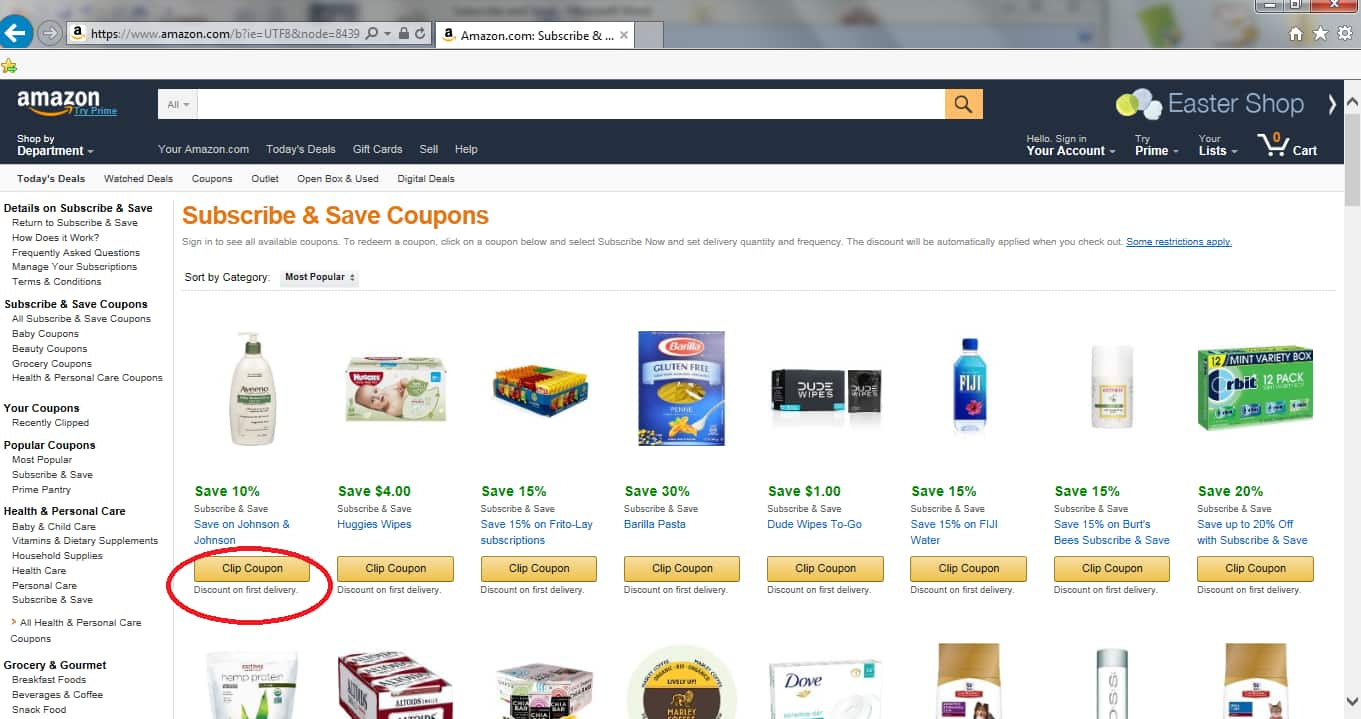
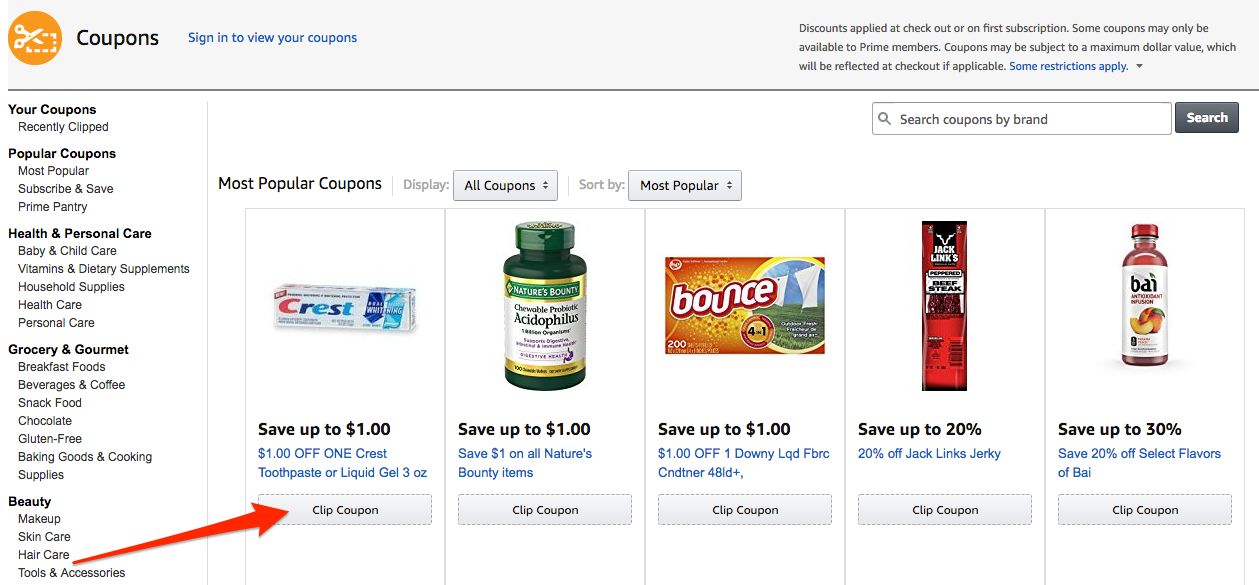
Amazon offers thousands of digital coupons across categories like groceries, household items, electronics and beauty products. Each coupon shows a specific discount amount or percentage off, and you clip it by tapping the green button on the product page or in the coupon section. Once clipped, the coupon is stored on your account and applied automatically when you check out with that item. Coupons rotate frequently, so checking the coupon page before a shopping session can surface discounts you would never find by searching alone.
Today's Deals and Lightning Deals
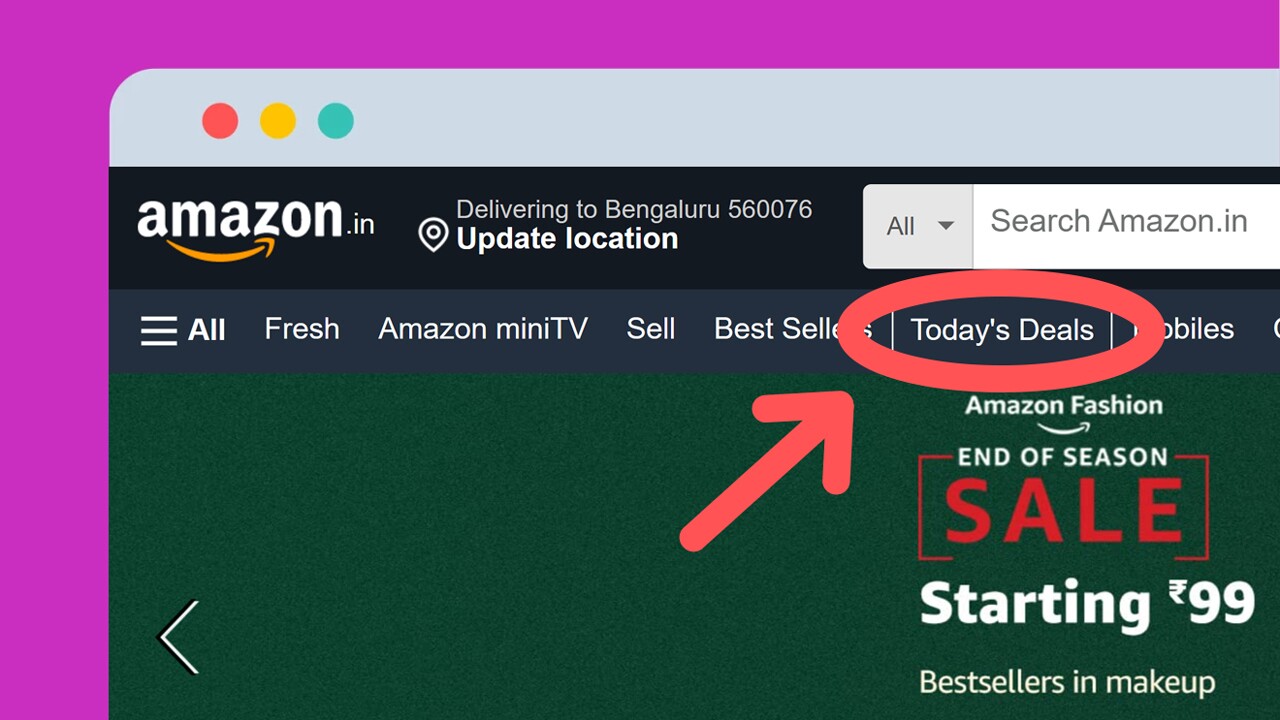
The Today's Deals section is a dedicated hub for active promotions including Deal of the Day, Lightning Deals and Prime-exclusive discounts. Lightning Deals are time-limited and quantity-limited, meaning the price drops for a short window or until the allocated stock runs out. Browsing this section daily or setting up deal alerts for categories you care about can help you catch deep discounts before they expire.
Subscribe and Save
Subscribe and Save lets you schedule automatic deliveries of everyday essentials like paper towels, pet food, vitamins and snacks at a discounted price. You get 5 percent off each delivery by default, and if you have five or more subscriptions arriving in the same month, the discount jumps to up to 15 percent off every item. You can skip, delay or cancel a delivery at any time with no penalty, making it one of the easiest ways to save on products you already buy regularly.
Amazon Warehouse
Amazon Warehouse lists open-box, returned and lightly used products at discounted prices. Each item is inspected and graded by condition, such as "Like New," "Very Good" or "Acceptable," so you know exactly what you are getting. Warehouse deals are especially useful for electronics, kitchen appliances and home goods where a minor cosmetic imperfection can mean a significant price drop with the same return policy and warranty as a new item.
Amazon Outlet
Amazon Outlet is a section dedicated to overstock and clearance items. It features new products that Amazon is trying to move quickly, often at 20 to 50 percent off the regular price. Unlike Warehouse items, Outlet products are brand new and unused. The selection changes constantly, so it is worth browsing when you are looking for a deal on something flexible rather than a specific model.
Price Drop Alerts and Wish Lists
The app lets you add any product to a wish list and sends you a notification when the price drops. This is one of the simplest but most effective tools for patient shoppers. If you do not need an item immediately, adding it to a list and waiting for a sale can save you a significant amount, especially during major shopping events like Prime Day or Black Friday.
Prime Member Exclusive Discounts
If you have a Prime membership, you get access to Prime-exclusive deals, early access to Lightning Deals and free one-day or two-day shipping on eligible items. Prime members also get access to Prime Day, the annual two-day shopping event with some of the deepest discounts of the year. Even outside of Prime Day, many products have a small "Prime Exclusive" discount that only appears for members at checkout.
App Screenshots
The Today's Deals hub on mobile, with countdown timers for Lightning Deals, a Deal of the Day banner and category filters to narrow down what is on sale.

Step-by-Step Tutorial
Here is a practical, end-to-end walkthrough for a single shopping session designed to maximize savings:
- Open the app and go to the main menu. Tap the three-line menu icon in the bottom or top navigation, then look for "Today's Deals" and "Coupons" in the list.
- Browse the Coupons section first. Filter by the category you are shopping in, such as Grocery, Beauty or Electronics. Tap "Clip Coupon" on any item you might want. There is no obligation to buy, and clipped coupons stay on your account until they expire.
- Check Today's Deals for Lightning Deals and Deal of the Day. Note the countdown timers and stock indicators. If a deal is still available and matches something you need, add it to your cart before the timer runs out.
- Search for the specific product you want. On the product page, look below the price for a coupon badge, a Subscribe and Save option and any "Save extra" promotions. Clip the coupon if available.
- Scroll down to check for Amazon Warehouse options. If a Warehouse listing for the same product is available at a lower price and an acceptable condition grade, consider it as an alternative to buying new.
- Add the item to your cart. If you chose Subscribe and Save, select your delivery frequency (every one to six months) and confirm. Remember that you can cancel after the first delivery if you do not want ongoing shipments.
- Review your cart before checkout. Make sure the coupon discount and any Subscribe and Save discount are both reflected in the order summary. If a coupon did not apply, go back to the product page to verify it was clipped correctly.
- Complete the purchase. Take a moment to compare the final total against the original listed price so you can see exactly how much you saved with coupons, deals and programs combined.
Use Cases
- Monthly grocery run: clip coupons for pantry staples, combine with Subscribe and Save for items you buy every month, and stack both for up to 20 percent off.
- Electronics upgrade: check Amazon Warehouse for open-box returns of the model you want, then compare against Today's Deals and Outlet for the best price on a new or like-new unit.
- Gift shopping on a budget: add gift ideas to a wish list in advance, wait for price drop notifications and buy during Prime Day or Black Friday for the deepest discounts.
- Household restock: use Subscribe and Save for toilet paper, cleaning supplies and pet food, building up to five or more subscriptions in one month to unlock the 15 percent tier.
- Seasonal clearance: browse Amazon Outlet at the end of each season for overstock deals on clothing, home decor and outdoor gear that Amazon is clearing out.
- Impulse deal hunting: open the Today's Deals section during a lunch break or commute to see if any Lightning Deals catch your eye at a fraction of the regular price.
Tips & Tricks
- Clip coupons before adding to cart. The coupon must be clipped first, and the discount is applied at checkout. If you add the item first and clip later, go back to your cart and re-add to ensure the coupon sticks.
- Stack coupons with Subscribe and Save. Many products accept both a clipped coupon and a Subscribe and Save discount, letting you combine two savings on a single item for the first delivery.
- Build your Subscribe and Save list to five items. The 5 percent default discount jumps to up to 15 percent when you have five or more subscriptions delivered in the same month, so group your essentials accordingly.
- Check price history with a third-party tracker. Browser extensions and websites that track Amazon price history can tell you whether a "deal" is actually a good price or just a temporary markdown from an inflated list price.
- Use wish lists for patience-based savings. Add items you want but do not need immediately to a wish list and enable price drop alerts. Amazon will notify you when the price falls, and you can buy at the lowest point.
- Browse Amazon Warehouse for returns and open-box items. The same return policy applies, so if the condition is not as described, you can send it back just like a new item.
- Look for "Amazon's Choice" and "Best Seller" badges with caution. These badges indicate popularity and fast shipping, not necessarily the best price. Always compare with similar products before buying.
- Shop during major events. Prime Day (typically July), Black Friday and Cyber Monday offer the widest selection of deep discounts. Plan your bigger purchases around these events for maximum savings.
- Check the "Extra Savings" section at checkout. Sometimes Amazon offers an additional promo at checkout that applies only if you meet a minimum spend or buy a specific combination of items.
Pros & Cons
Pros
- Multiple overlapping discount programs (coupons, deals, Subscribe and Save, Warehouse, Outlet) that can be stacked for significant savings.
- Digital coupon system is easy to use and automatically applies at checkout once clipped.
- Subscribe and Save offers genuine recurring savings on everyday essentials with the flexibility to skip or cancel anytime.
- Amazon Warehouse provides a reliable way to buy open-box and returned items at a discount with the same return policy as new products.
- Price drop alerts on wish lists make it easy to wait for the right moment to buy without constantly checking manually.
- Prime members get exclusive deals, early access to Lightning Deals and free fast shipping that adds value beyond the listed product price.
Cons
- Coupons and deals rotate frequently, so a discount you see today may be gone tomorrow, which can make impulse buying tempting.
- Subscribe and Save requires managing your subscription list actively to avoid receiving items you no longer need and being charged for them.
- Lightning Deals can sell out in minutes, and the countdown timer creates pressure that may lead to hasty purchases.
- Warehouse items are limited in stock and condition varies, so you may not always find the exact product you want at a discounted price.
- Not all products have coupons or deals, and some "discounts" are based on inflated list prices that make the savings look larger than they really are.
- Prime membership costs money, so the exclusive benefits only pay off if you shop on Amazon frequently enough to justify the annual or monthly fee.
Alternatives / Comparison
| App | Core difference | Best for |
|---|---|---|
| Walmart | Price-matching policy and local store pickup, but fewer coupon and deal programs | Shoppers who want local pickup and simple rollback pricing |
| eBay | Auction and best-offer format for used and collectible items, but no Subscribe and Save or coupon system | Shoppers looking for rare, used or negotiable-price items |
| Target | RedCard discount and Circle offers, but smaller product catalog than Amazon | Shoppers who want a store-loyalty discount and same-day pickup |
| Amazon Shopping | Largest catalog with the most layered discount programs (coupons, deals, Subscribe and Save, Warehouse, Outlet) | Shoppers who want the widest selection and the ability to stack multiple savings programs |
FAQs
How do I find coupons on the Amazon Shopping app?
Open the app, tap the menu icon and look for "Coupons" in the list. You can browse by category and tap "Clip Coupon" on any item. The discount is applied automatically at checkout when you purchase that item.
Can I use more than one coupon on the same item?
Generally, you can use one clipped coupon per item, but you can often stack a coupon with a Subscribe and Save discount or a Lightning Deal price. The order summary at checkout will show which discounts were applied.
What is the difference between Amazon Warehouse and Amazon Outlet?
Amazon Warehouse sells open-box, returned and lightly used products at discounted prices with a condition grade. Amazon Outlet sells brand new overstock and clearance items at reduced prices. Both rotate inventory frequently.
How does Subscribe and Save work and is it worth it?
You select a delivery frequency for eligible products and get a discount on each shipment. The discount starts at 5 percent and goes up to 15 percent when you have five or more subscriptions in the same month. You can skip, delay or cancel anytime, so it is worth it for items you already buy regularly.
Do I need a Prime membership to get coupons and deals?
No. Most coupons and Today's Deals are available to all shoppers. However, Prime members get exclusive deals, early access to some Lightning Deals and free fast shipping, which adds extra value on top of the same discounts.
How can I tell if an Amazon deal is actually a good price?
Use a price-tracking website or browser extension to check the price history of the product. This shows you whether the current deal price is genuinely low compared to the average price over the past several months, or whether the list price was inflated to make the discount look bigger.
Can I cancel Subscribe and Save after the first delivery?
Yes. You can skip, delay or cancel any subscription at any time from your account settings with no penalty. Many shoppers use Subscribe and Save for the first delivery to get the discount and then cancel if they do not want ongoing shipments.
Conclusion
Amazon Shopping is more than just a storefront. It is a layered discount ecosystem where coupons, Lightning Deals, Subscribe and Save, Warehouse and Outlet can all work together to lower your total. The key is to shop with a plan: clip coupons before adding to cart, compare prices across deal programs, use wish lists for patience-based savings and stack discounts wherever the app allows. If you take a few minutes to check the available offers before every purchase, the savings add up quickly. Start with your next shopping session by visiting the Coupons and Today's Deals sections first, and you will likely find a discount you would have missed otherwise.
Safety Note and Disclaimer
Our website is a third-party distribution and information site, not the official app store or the app developer.
Download only from a source you trust and verify the source.
Review the permissions the app requests and decline anything that looks excessive.
Keep your device's security settings and antivirus up to date.
Prefer official stores (Google Play) when the app is available there.
This article is an independent overview and is not affiliated with the app's developer.